
Remember when Chrome’s most talked-about feature was saving passwords? Those days are behind us. Google has introduced Chrome Auto Browse, a new capability that lets Gemini AI actively browse websites and perform tasks on your behalf. This includes searching for products, comparing options across multiple tabs, booking appointments, filling out forms, and adding items to shopping carts—all from a persistent side panel inside the Chrome browser.
Chrome Auto Browse launched today as a preview for Google AI Pro and Ultra subscribers in the United States. Built on Gemini 3, the feature appears in a dedicated side panel that remains available as you move between tabs. From that panel, Gemini can navigate pages, click through links and buttons, complete multi-step processes, and manage time-consuming tasks that normally require manual effort.
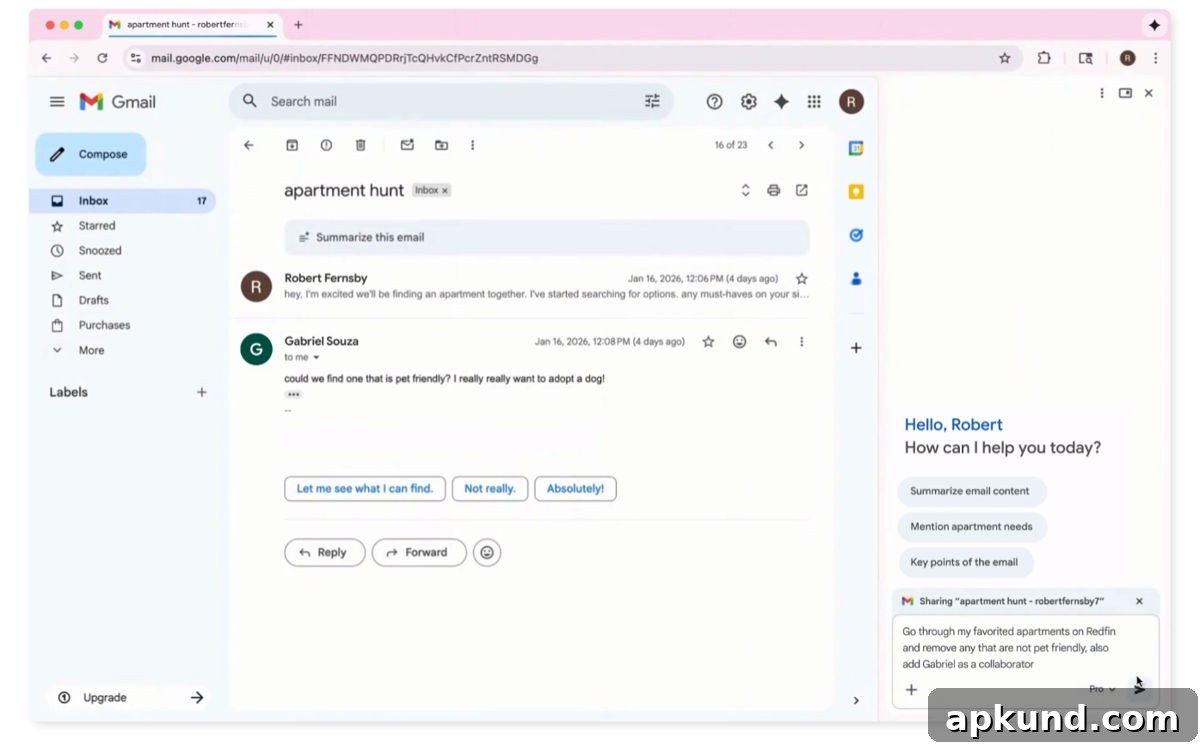
Using Chrome Auto Browse is straightforward. You type or speak what you want in the side panel, and Gemini interprets the request and acts within the browser. For example, if you ask it to organize a Y2K-themed party, Gemini can analyze an inspiration image, identify décor elements, search for similar items across retailers, compare prices, and add suitable selections to your cart while staying inside the budget you specify. The assistant can juggle multiple tabs and keep track of comparisons so you don’t have to.
Google has built safeguards to prevent unintended actions. Chrome Auto Browse will pause and ask for your explicit approval before completing sensitive operations such as making purchases or posting on social media. If the task requires signing into a site, Gemini will request access to credentials stored in Google Password Manager rather than attempting to enter credentials on its own. These prompts ensure you remain in control of transactions and account access.
What else is new in Chrome
Alongside Auto Browse, Google added several enhancements to make Chrome more capable and convenient. The side panel now supports Nano Banana, Gemini’s image-generation and editing tool, so you can create or refine images directly in the browser without needing separate apps or reuploads. That streamlines basic image edits, mockups, and concept visuals while you browse or shop.
Gemini’s integration with Chrome also extends to other Google services. The assistant can surface relevant information from Gmail, Google Calendar, YouTube, and Google Flights while you work in the browser, reducing the need to open multiple tabs. Google has announced that Personal Intelligence—an upcoming capability that lets Chrome retain contextual info from past interactions to provide more personalized replies—will roll out to Chrome users in the coming months. That feature aims to make recommendations and responses that better reflect your preferences and prior conversations.
Chrome Auto Browse and the broader Gemini integrations are available now to Google AI Pro and Ultra subscribers on Windows, macOS, and Chromebook Plus devices in the US. For subscribers, the feature promises to save time on routine tasks and simplify complex multi-step activities by letting a capable assistant handle browsing, searching, and preliminary decision-making inside the browser itself.
As with any new automation tool, users should evaluate how much control to delegate and verify actions before approving purchases or account changes. Chrome Auto Browse is positioned as an assistant that performs the legwork while keeping you in the loop for critical approvals, combining convenience with user oversight.