
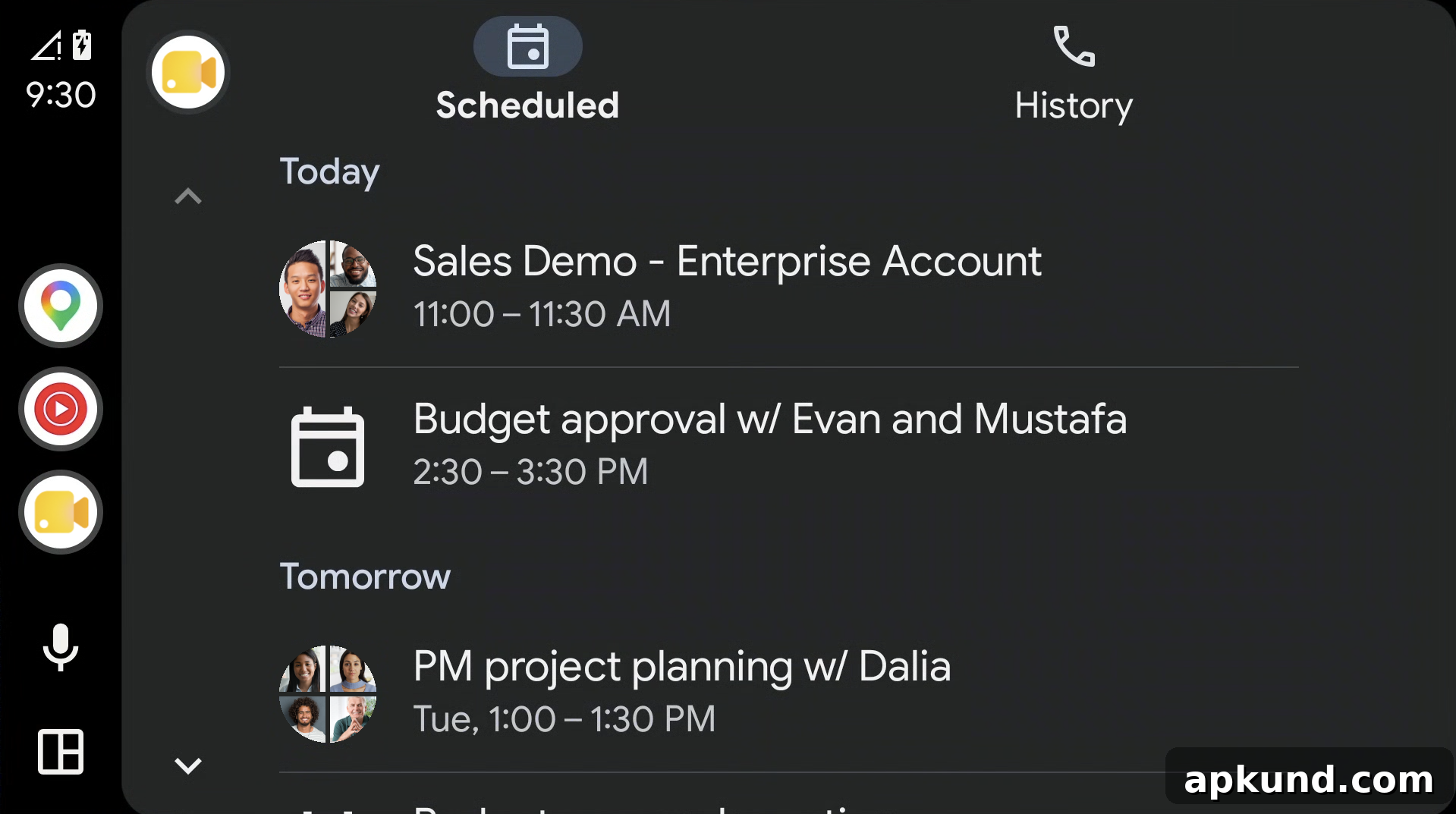
If you drive a vehicle with Android Auto integration, check your phone and car for a new update: Google has confirmed the rollout of Google Meet for Android Auto. The integration lets drivers access upcoming meetings, join active audio sessions, and place direct audio calls from the vehicle’s dashboard display, using hands-free controls for safer operation while on the road.
What Google Meet on Android Auto Offers
With Meet on Android Auto, drivers can view scheduled meetings and join them with a single tap on the car display. The feature focuses on audio-only communication to minimize distraction, so neither party transmits video during calls initiated through the vehicle. In addition to join and mute controls, the interface includes a call history tab to quickly redial recent contacts or rejoin recent meetings.
Ease of Use and Default Availability
The feature requires no administrative setup. If you have the Google Meet app installed on an Android device that is connected to a compatible vehicle, Meet for Android Auto is enabled by default. This applies to personal Google accounts as well as Google Workspace customers and Workspace Individual subscribers, simplifying access regardless of account type.
Safety and Hands-Free Controls
Google emphasizes safety by restricting Meet on Android Auto to audio-only sessions and providing hands-free interactions through the vehicle’s voice controls and steering-wheel buttons where supported. The integration is designed to let drivers manage meetings and calls without taking their eyes off the road or handling their phone, helping to reduce distraction while maintaining productivity on the go.
Rollout Timeline and Availability
The launch is currently live for Rapid Release domains. Scheduled Release domains will receive the update in the weeks following this initial rollout, with Google indicating full global availability by June 26, 2026. As the update becomes available, users should see Meet appear on compatible Android Auto displays when their phone is connected.
Compatibility and Requirements
To use Google Meet on Android Auto, you need an Android phone with the Google Meet app installed and a vehicle that supports Android Auto. No additional admin configuration is necessary for most users. If your vehicle display does not show Meet immediately after the rollout reaches your account type or release track, check for system updates for both Android Auto and your phone, and verify that your car’s infotainment firmware is current.
Privacy and Limitations
Because Meet on Android Auto runs in audio-only mode, it avoids transmitting video from either caller while in the vehicle, which reduces bandwidth use and addresses some privacy concerns related to in-car video. The integration focuses on straightforward calling and meeting access; users who require advanced Meet functionality—such as screen sharing or camera-based participation—will need to join via a phone, tablet, or computer outside the vehicle.
Practical Tips for Drivers
- Confirm that your Google Meet app is up to date on your Android device to ensure compatibility with the Android Auto update.
- Before relying on Meet in your daily commute, test the feature while parked to familiarize yourself with the dashboard controls and voice commands.
- Use the built-in mute and volume controls on the vehicle to manage audio quickly during meetings.
- If you regularly join meetings while driving, schedule important calls for when you can be stationary to avoid relying solely on in-vehicle controls for complex interactions.
Summary
Google Meet for Android Auto brings convenient, audio-only meeting access directly to compatible vehicle dashboards. The rollout prioritizes safety by enabling hands-free operation and disabling video while in the car. The update is enabled by default for users with the Meet app installed and is being deployed across Rapid and Scheduled Release domains, with global availability expected by June 26, 2026. For most users, no additional setup is required—just connect a supported Android device to an Android Auto-equipped vehicle and start joining meetings from the road.