Many Spotify listeners organize their playlists by familiar factors like genres, artists, or moods. Some even let AI assemble a list for them. But a subset of users prefers a more technical approach, arranging tracks by beats per minute (BPM) or by musical key to achieve a smoother, more consistent listening experience.
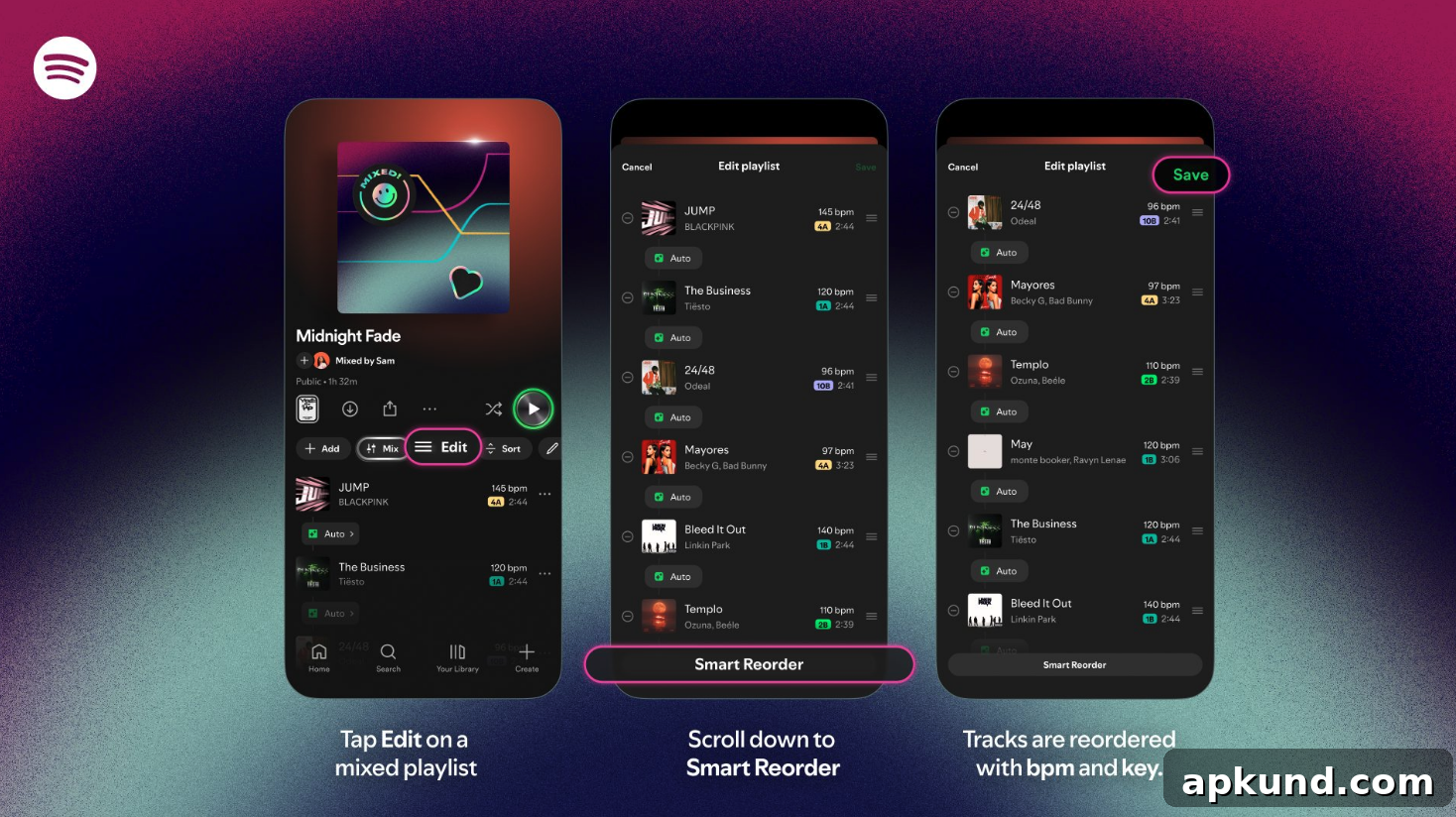
Spotify has responded to that demand with a new Smart Reorder tool that allows listeners to reorder playlists either by key or by BPM. The feature is designed to help users build playlists with a coherent musical flow, smoothing transitions between tracks and creating listening sequences that feel more intentional and polished. To use Smart Reorder, open the playlist you want to adjust, tap the Mix option, then choose Edit and select Smart Reorder. From there you can pick whether to sort by song key or by BPM so the playlist follows the preference you set.
Smart Reorder can be particularly useful for a number of listening situations. DJs and hobbyists who make workout mixes or background music for events can rely on BPM sorting to keep energy levels steady or to build intensity gradually. Sorting by key helps listeners create harmonically compatible sequences where adjacent songs naturally blend without awkward tonal shifts. Both approaches give more control to listeners who care about technical details and subtle continuity in their playlists.
It’s important to note that Smart Reorder is currently available only to Spotify Premium subscribers. If you use the free tier, you won’t see the Smart Reorder option until Spotify expands availability. For Premium users, however, the tool is a straightforward addition to existing playlist controls and integrates with the platform’s other mixing and personalization features.
Alongside Smart Reorder, Spotify has been expanding other AI-enhanced playlist functions. One example is the Prompted Playlist feature, which lets users create playlists simply by describing what they want. Instead of manually selecting tracks or digging through an artist’s catalog, you can describe a mood, an activity, or a theme—such as songs for a rainy afternoon, music for a long run, or music inspired by a favorite film—and the service generates a playlist tailored to that prompt. This kind of feature is intended to make playlist creation faster and more intuitive for casual users while still supporting the needs of more detail-oriented listeners.
Both Smart Reorder and Prompted Playlist reflect how streaming services are blending traditional listening habits with new tools that encourage experimentation. For people who like to fine-tune pacing, harmonic flow, and energy across a playlist, Smart Reorder provides a simple, automated way to achieve those goals without manually dragging each track into place. For listeners who prefer a quick, conversational approach to playlist creation, Prompted Playlist reduces the time and effort required to get a satisfying result.
For creators, curators, and everyday listeners, these developments emphasize convenience and creative control. Whether you’re crafting a set to play at a small gathering or updating your weekly workout mix, the ability to sort by BPM or key gives you more predictable results. And if you enjoy experimenting with different ordering strategies, Smart Reorder makes it easy to compare how a playlist sounds when arranged by tempo versus when arranged by harmonic compatibility.
As with any evolving feature set, availability and capabilities may expand over time. For now, Premium subscribers have the earliest access to Smart Reorder and can start using it immediately from the Mix > Edit > Smart Reorder flow on their playlists. If you value a more seamless musical progression or want playlists that respect tempo and key, Smart Reorder is a useful addition to Spotify’s suite of personalization tools.