
You install an app, and suddenly your phone barely makes it to lunch. Tracking down the culprit usually means digging through battery settings and guessing which app is at fault. Google has introduced a change to help prevent that problem from reaching you in the first place.
Beginning March 1, the Google Play Store started rolling out battery-drain warnings directly on app listing pages. When an app is flagged, its download page displays a clear notice that says the app “may use more battery than expected due to high background activity.” That means you no longer have to download an app and discover the battery impact the hard way; the Play Store will surface an alert up front so you can make a more informed choice before installing.
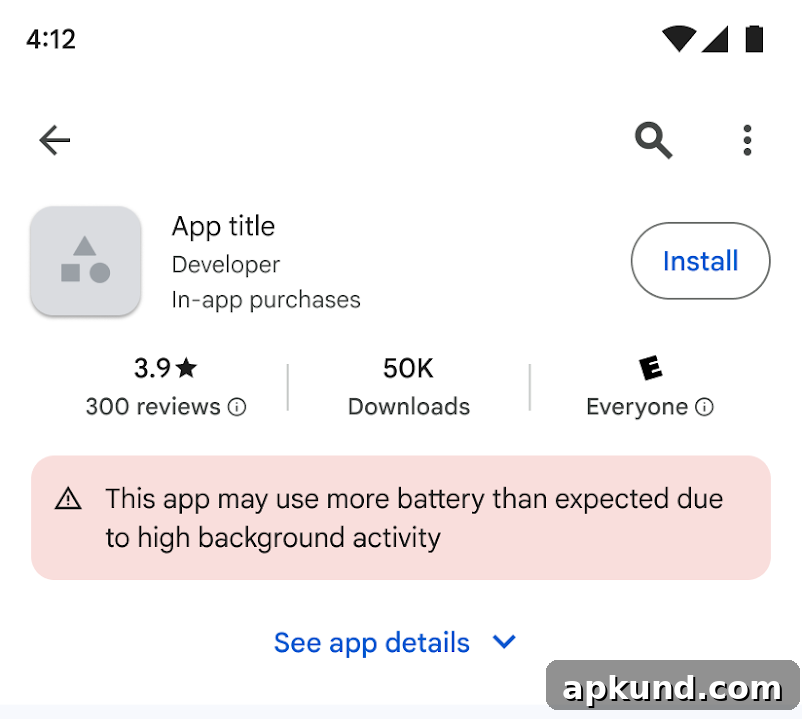
The warning targets a specific behavior Google calls “Excessive Partial Wake Locks.” A partial wake lock is when an app keeps the phone’s processor awake while the screen is off and you are not actively using the device. According to Google’s threshold, an app is considered problematic if it accumulates more than two hours of unnecessary background wake locks in a 24-hour period. Apps that legitimately require background activity—such as music players, navigation, and other services that must run while the screen is off—are excluded from this measurement and won’t be penalized for warranted background use.
Google developed the metric with input from Samsung and built it using real-world usage data across Android devices. Developers can already review wake lock statistics through the Android Vitals dashboard, which means many developers had advance notice and an opportunity to optimize their apps. For apps that have not addressed high background activity, the Play Store will now show the battery-warning label. In addition to the label itself, Google may reduce visibility for offending apps in Play Store recommendations and search results, applying a meaningful incentive for developers to fix issues promptly.
What this means for you
The rollout is gradual, so not every app that triggers the threshold will show a warning immediately. Google says affected apps will be flagged over the coming weeks as the system evaluates more usage data. For users, this means the Play Store becomes a more useful shopping environment: a quick glance at an app listing will now reveal potential battery problems that previously required trial and error to uncover.
If you rely on battery life for a busy day, these warnings can help you avoid apps that might cause unexpected drain. When you see the label on an app page, consider whether the app’s background activity is necessary for your use case. For example, a navigation app that needs to run in the background for turn-by-turn directions is an appropriate exception, while a social or utility app that keeps the processor awake without a clear reason could be a red flag.
For developers, the label is a public signal to correct inefficient background behavior. App creators can monitor the Android Vitals dashboard to identify and resolve excessive wake locks, improve battery efficiency, and avoid the visibility and reputation costs that come with a Play Store warning. In many cases, small optimizations to background scheduling, batching network requests, or relying on platform APIs designed for deferred work can eliminate excessive wake locks and restore an app’s standing.
Overall, this change benefits the Android ecosystem by making battery impact more transparent and encouraging developers to prioritize efficient background behavior. As the Play Store gradually applies the warnings, users should see fewer surprise drains and more useful context when deciding which apps to install. The result should be better battery performance for many devices and a clearer marketplace where well-behaved apps are easier to find.