
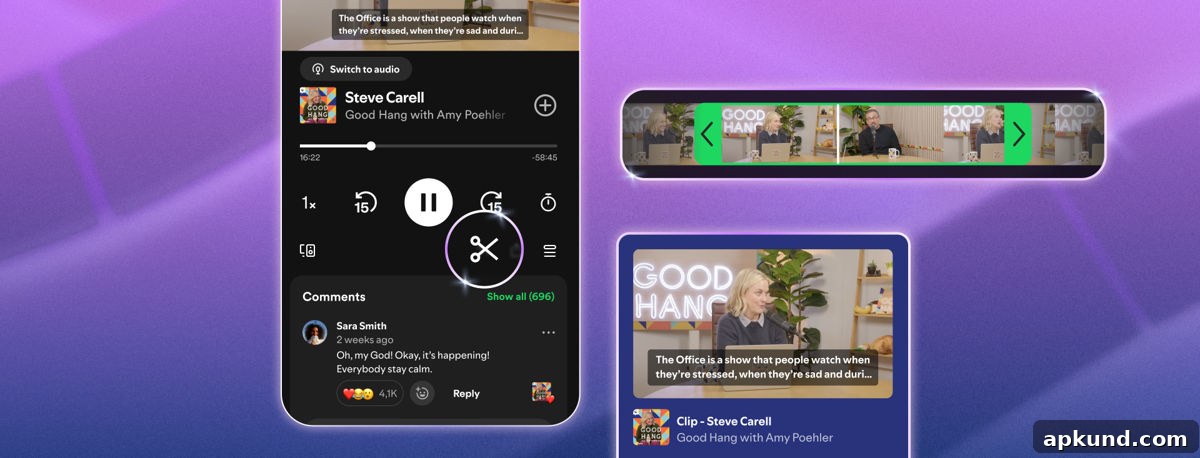
Sharing a specific moment from a podcast has long been awkward: you typically send a full episode link with a timestamp and hope the recipient jumps to the right spot. Spotify has introduced a more direct solution with a new clipping feature for podcasts that lets listeners trim and share exact moments from episodes inside the app.
Spotify rolled out Podcast Clips on Wednesday. The feature is available now on mobile for both Free and Premium users and is designed to make it easier to capture, save, and distribute short excerpts from audio or video podcast episodes.
How It Works
Creating a clip is simple and intuitive. While an episode plays, tap the new scissors icon in the Now Playing view to open the clip editor. A selector appears that lets you mark a precise start and end point for the segment you want to extract. After setting the segment, you can preview the clip, save it to your library, or share it immediately.
Saved clips are stored in a dedicated Clips folder inside Your Library, giving you quick access to all the moments you’ve captured. From there you can replay clips, remove them, or add them to a podcast playlist for easier organization and later listening. The updated sharing menu also offers flexible options: share the full episode, a chapter, a timestamp, or the newly created clip. Clips can be sent directly to other Spotify users through the app’s messaging feature or shared to other apps supported by your device.
Podcast Clips support both audio-only and video podcast formats, expanding the ways creators and listeners can highlight memorable segments. Availability of the clip feature will roll out gradually across shows, so not every podcast will support clipping immediately. Spotify has indicated that early testing of the feature led to an increase in how often users saved podcast content overall, suggesting clips may boost engagement with shows and help listeners collect notable moments.
Why This Matters
The timing of Spotify’s Podcast Clips is notable in the context of the wider digital media landscape. Earlier this year, another major platform scaled back a similar user-facing Clips feature in favor of a simpler timestamp sharing option. Spotify’s implementation targets podcasts specifically, giving listeners a built-in, fine-grained way to extract and spread short moments from episodes. That capability can be useful for sharing standout quotes, funny exchanges, key facts, or promotional snippets that might entice new listeners to a show.
For creators, clips offer a new promotional tool. Short, shareable excerpts are easier for listeners to distribute on social platforms and in private messages, increasing the potential reach of individual episodes. Because clips are stored within Spotify and can be added to playlists, creators and fans alike gain another way to curate and highlight notable content over time.
Where This Fits in Spotify’s Podcast Strategy
Podcast Clips aligns with Spotify’s broader push to improve the podcast experience for both creators and listeners. The company has recently introduced features aimed at supporting monetization for creators, as well as search and discovery improvements to help users find shows they’ll enjoy. Clips complement these efforts by simplifying how highlights are shared and preserved, and by creating more touchpoints for discovery when listeners encounter a memorable moment and want to share it.
Whether Podcast Clips becomes a regular part of listeners’ workflows depends on adoption by both creators and audiences. If listeners embrace clipping and sharing, it could become a routine way to promote episodes and surface content, helping smaller shows grow their audiences and giving creators a straightforward tool for generating interest.
Overall, Spotify Podcast Clips take a common sharing frustration — sending someone a long episode and hoping they find the right spot — and replace it with a precise, built-in solution. By enabling audio and video clipping, saving to library playlists, and offering multiple sharing options, the feature aims to make podcast moments more accessible and easier to share.