
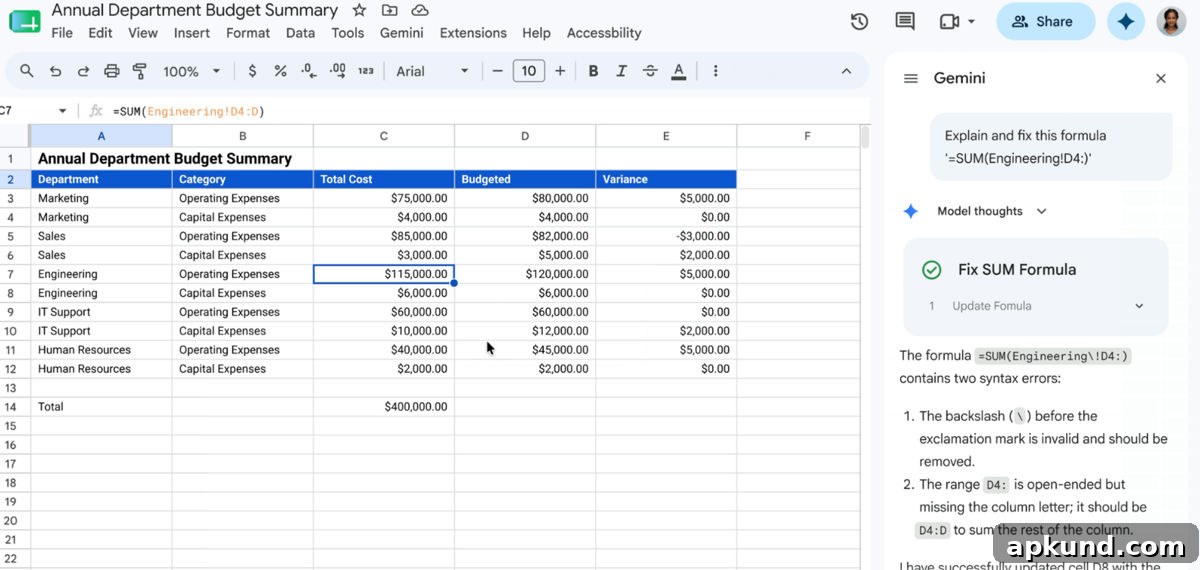
Anyone who’s used Google Sheets has encountered that frustrating wall: a formula that looks correct suddenly returns #REF! or #VALUE! with no clear explanation. The usual response is to squint at the formula bar, comb through cell references, or search for the error code online. You might even paste your formula into an AI chat for help, but the chatbot can’t see the surrounding spreadsheet context, so guidance can miss the real issue. Google has introduced a new Gemini-powered Sheets feature that diagnoses and corrects formula errors right where they occur. According to Google’s Workspace update, Gemini analyzes the nearby data and explains the problem in plain English while offering a corrected formula beside the error.
Why this matters beyond saving time
Google Sheets can feel intimidating for newcomers and even for experienced users tackling complex formulas. Functions that combine nested logic, ranges, and text manipulation are powerful but unforgiving: a misplaced comma, an extra space, or a wrong range reference can turn a working calculation into gibberish. That fragility discourages people from using Sheets’ more advanced capabilities and drives many to stick with repetitive manual entry or simpler tools.
The Gemini Sheets formula fix changes that dynamic. Instead of having to extract a formula, describe the problem in a chat window, and hope the suggested correction applies to the exact cells and data you have, the diagnostic runs inside the spreadsheet itself. When an error appears, you can trigger the feature and get an explanation tailored to the specific context: which cells are referenced, what data types were expected, and how the formula’s logic breaks down. In addition to plain-language guidance, the feature suggests a corrected formula you can apply with a single click. It reduces trial-and-error, shortens troubleshooting time, and helps users learn why a given formula failed so they can avoid the same mistake later.
Beyond time savings, the Gemini integration addresses a broader accessibility problem. Spreadsheets are meant to model data and automate tasks, but complex functions often come with a steep learning curve. Many people avoid formulas that look intimidating or assume they need a technical background to build them. By offering contextual explanations and on-the-spot corrections, this feature lowers the barrier to using advanced Sheets functions. It effectively turns each error into a micro-tutorial, helping users build confidence and competence as they work.
Google is rolling the feature out gradually. The company says the Gemini formula fix is being deployed now and will be available through July 15 to Business Standard, Enterprise, and Google AI Pro and Ultra subscribers. During the initial rollout window, usage limits are relaxed to let more users try the capability. If you have access through a qualifying Workspace subscription, you should soon see an option to troubleshoot formula errors directly in your sheet. For organizations, this can reduce support overhead: fewer help tickets about broken formulas, and faster self-service debugging for everyday spreadsheet users.
Technically, the hardest part of many Sheets functions has rarely been syntax alone. Much of the friction comes from understanding how data types, ranges, and function chaining interact in a specific sheet. Generic AI responses, which lack sight of the actual spreadsheet, often miss subtle details—like an unexpected text value in a numeric column or a misaligned range reference. By analyzing the exact cells and surrounding context, Gemini can identify those subtle mismatches and propose precise corrections. The result is not only a corrected formula but an explanation that connects the correction to the underlying data problem.
For users who design templates, dashboards, or recurring reports, that clarity is especially valuable. Templates rely on predictable data formats; a single irregular entry can cascade into widespread errors. With contextual diagnostics, template authors can more quickly spot vulnerabilities, add validation, or rework a formula to be more robust. For teams collaborating in Sheets, the feature improves shared understanding: comments and suggested fixes are grounded in the actual sheet state rather than hypothetical examples.
Ultimately, Google’s Gemini Sheets formula fix is a practical improvement with educational benefits. It reduces the intimidation factor around advanced formulas, speeds up troubleshooting, and helps users learn by doing. For anyone who has stared at a #REF! or #VALUE! and felt stuck, having a clear explanation and a one-click correction available in the same worksheet could change how they use Sheets—turning frustrating roadblocks into teachable moments and making spreadsheet work more accessible and productive.